





Includes Office applications*

Includes Office applications

Supports subscription sharing for up to 6 users*

Up to 2TB of shared cloud storage^

New Copilot Features in Microsoft 365
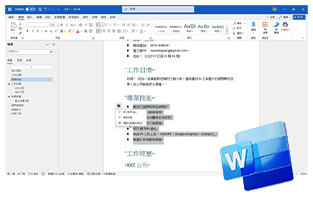
Copilot in Word
Intelligent Content Generation and Visualization
Easily generate document titles and content with simple commands. Upload data for summarization, key points, or new content. It can also rewrite as needed and create optimized visualizations.
Copilot in Excel
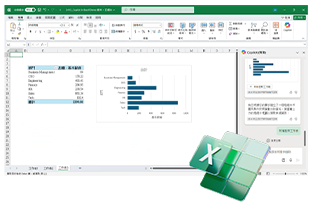
Data Analysis and Visualization
Enter commands to summarize and analyze data, visualizing it as charts without needing complex formulas.
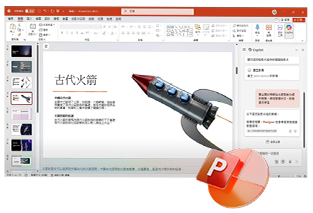
Copilot in PowerPoint
Intelligent Content and Layout Generation
Input commands for content, audience, and style to automatically generate relevant citations and images. Optimize the layout for more efficient PPT creation.
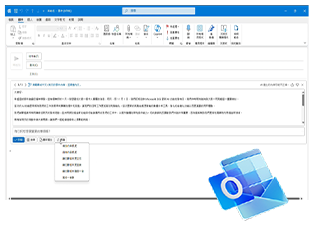
Copilot in Outlook
Email Generation, Rewriting, and Summary Analysis
Enter ideas to generate complete emails with multiple options. Adjust length and tone, support multilingual writing, and utilize the summary feature for quick key point extraction.
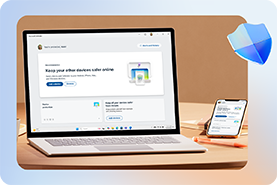
Properly Protect Your Files
Comprehensively protect your photos, documents, emails, personal information, and devices, ensuring that your cherished digital assets remain safe and secure.
| Product | Microsoft 365 Family | Microsoft 365 Personal |
|---|---|---|
| Number of Users | Up to 6 people | 1 person |
| Devices | Including Windows, iOS, and Android (iOS and Android require separate app installation) | Including Windows, iOS, and Android (iOS and Android require separate app installation) |
| OneDrive Cloud Storage | 2TB | 1TB storage |
| Word/Excel/ PowerPoint |
✓ | ✓ |
| Outlook | ✓ | ✓ |
| Publisher & Access | ✓ PC Only | ✓ PC Only |
| Tech Support | ✓ | ✓ |
| 16% off**Price | $85/month (auto terminate after contract end) | $65/month (auto terminate after contract end) |
| Commitment period | 12 months | 12 months |

Purchase flow
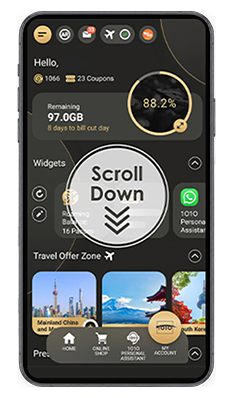
1.Select “ Value-added Service” at Home page
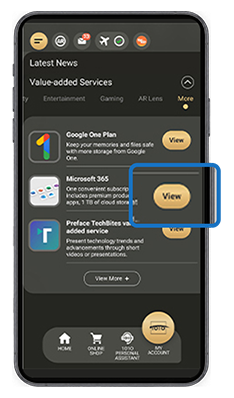
2.Select “View” at “More”
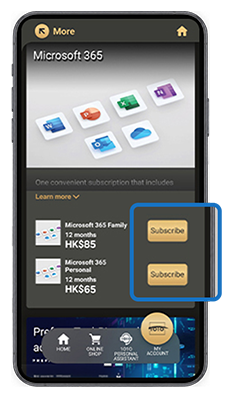
3.Select “Subscribe”
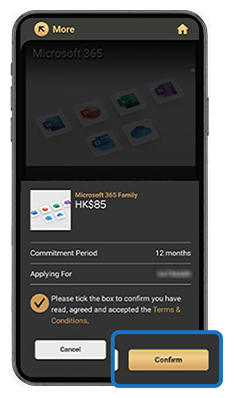
4.Select “Confirm” to purchase and the promo code will be displayed
The product key will be sent to the customer through SMS to the registered mobile number.
- Register a Microsoft Account
- Access https://redeem.microsoft.com/ and enter the product key.
*The Product key is valid for 6 months from the day of plan effective.


| Terms and conditions for Microsoft 365 Personal/Family Plan: | |
|
|
| *AI features are only available to the subscription owner and cannot be shared with additional Microsoft 365 Family members, with usage limitations. Microsoft 365 Personal and Family Subscribers get 60 AI credits per month, which can be used across various applications, including Word, Excel, PowerPoint, Outlook, Forms, OneNote, Designer, Notepad, Photos, and Paint. Minimum age limits may apply to use of AI features. Details: https://aka.ms/Copilot-In-M365-FAQ | |
| ^ "Microsoft 365 Family Plan" includes up to 2 TB of cloud storage, which can be shared among one to six people. | |
| **The monthly subscription prices for the family and personal plans on the Microsoft official website are HK$102 and HK$78, respectively. | |
| Microsoft 365 Promotion Terms & Conditions: | |
|
|
Includes Office applications*
Includes Office applications
Supports subscription sharing for up to 6 users*
Up to 2TB of shared cloud storage^
New Copilot Features in Microsoft 365
Copilot in Word
Intelligent Content Generation and Visualization
Easily generate document titles and content with simple commands. Upload data for summarization, key points, or new content. It can also rewrite as needed and create optimized visualizations.
Copilot in Excel
Data Analysis and Visualization
Enter commands to summarize and analyze data, visualizing it as charts without needing complex formulas.
Copilot in PowerPoint
Intelligent Content and Layout Generation
Input commands for content, audience, and style to automatically generate relevant citations and images. Optimize the layout for more efficient PPT creation.
Copilot in Outlook
Email Generation, Rewriting, and Summary Analysis
Enter ideas to generate complete emails with multiple options. Adjust length and tone, support multilingual writing, and utilize the summary feature for quick key point extraction.
Properly Protect Your Files
Comprehensively protect your photos, documents, emails, personal information, and devices, ensuring that your cherished digital assets remain safe and secure.
| Product | Microsoft 365 Family | Microsoft 365 Personal |
|---|---|---|
| Number of Users | Up to 6 people | 1 person |
| Devices | Including Windows, iOS, and Android (iOS and Android require separate app installation) | Including Windows, iOS, and Android (iOS and Android require separate app installation) |
| OneDrive Cloud Storage | 2TB | 1TB storage |
| Word/Excel/ PowerPoint |
✓ | ✓ |
| Outlook | ✓ | ✓ |
| Publisher & Access | ✓ PC Only | ✓ PC Only |
| Tech Support | ✓ | ✓ |
| 16% off**Price | $85/month (auto terminate after contract end) | $65/month (auto terminate after contract end) |
| Commitment period | 12 months | 12 months |
Purchase flow
1.Select “ Value-added Service” at Home page
2.Select “View” at “More”
3.Select “Subscribe”
4.Select “Confirm” to purchase and the promo code will be displayed
The product key will be sent to the customer through SMS to the registered mobile number.
- Register a Microsoft Account
- Access https://redeem.microsoft.com/ and enter the product key.
*The Product key is valid for 6 months from the day of plan effective.
| Terms and conditions for Microsoft 365 Personal/Family Plan: | |
|
|
| *AI features are only available to the subscription owner and cannot be shared with additional Microsoft 365 Family members, with usage limitations. Microsoft 365 Personal and Family Subscribers get 60 AI credits per month, which can be used across various applications, including Word, Excel, PowerPoint, Outlook, Forms, OneNote, Designer, Notepad, Photos, and Paint. Minimum age limits may apply to use of AI features. Details: https://aka.ms/Copilot-In-M365-FAQ | |
| ^ "Microsoft 365 Family Plan" includes up to 2 TB of cloud storage, which can be shared among one to six people. | |
| **The monthly subscription prices for the family and personal plans on the Microsoft official website are HK$102 and HK$78, respectively. | |
| Microsoft 365 Promotion Terms & Conditions: | |
|
|
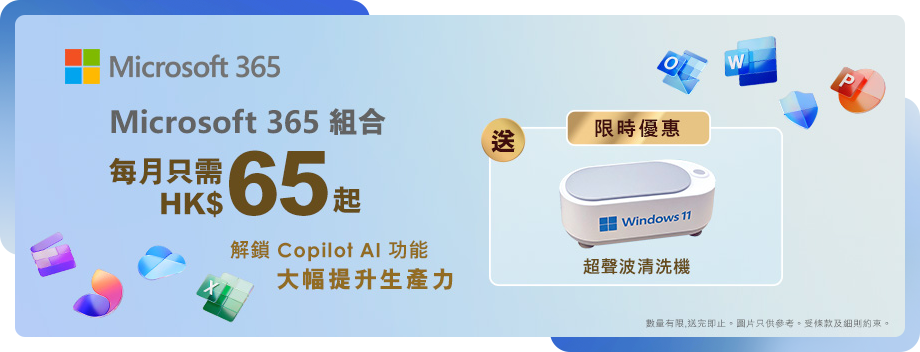
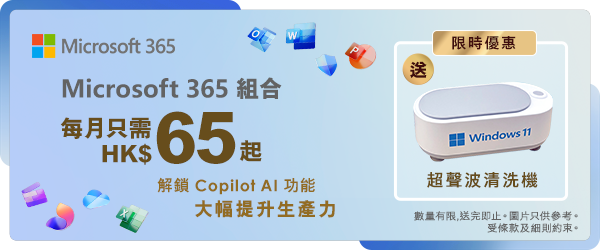
AI 功能提升生產力*
支持最多 6 人共同訂閱*
包含 Office 應用程式
多達 2TB 共享儲存空間^
Microsoft 365 新增的 Copilot 功能
Copilot in Word
智慧內容生成與視覺化
輸入指令即可自動生成文件標題及詳細內容,還可上傳資料進行摘要、濃縮重點或創作新內容,更可以根據指令改寫內容並進行視覺化,優化設計。
Copilot in Excel
數據分析與視覺化
輸入指令即可智慧摘要數據、分析,並將其視覺化為圖表,無須記住繁瑣公式函數。
Copilot in PowerPoint
PPT 智慧生成與排版
輸入簡報所需的內容、受眾、風格等指令,即可自動生成符合主題的引用文獻及相關圖片,還可優化排版,讓 PPT 製作更加高效。
Copilot in Outlook
郵件生成、改寫與摘要分析
輸入大致思路即可生成郵件全文,提供多個選項選擇,並可調整文章長度和語調,支持多語言撰寫。同時,可透過摘要功能快速擷取郵件核心重點,幫助您迅速了解內容。
妥善保護你的檔案
全面保障您的照片、文件、電子郵件、個人資料和裝置的安全,確保您所珍視的數位資產安然無虞。
| 產品 | Microsoft 365 家用版 | Microsoft 365 個人版 |
|---|---|---|
| 用戶數量 | 最多6個用戶使用 | 1個用戶 |
| 裝置 | 適用於 Windows、macOS、iOS 和Android (iOS 和 Android 需另外安裝軟件) | 適用於 Windows、macOS、iOS 和Android (iOS 和 Android 需另外安裝軟件) |
| OneDrive 雲端儲存 | 2TB | 1TB |
| Word/Excel/ PowerPoint |
✓ | ✓ |
| Outlook | ✓ | ✓ |
| Publisher & Access | ✓ (僅適用於 PC) | ✓ (僅適用於 PC) |
| 技術支援 | ✓ | ✓ |
| 84折**月費 | $85(承諾期後自動取消) | $65(承諾期後自動取消) |
| 承諾期 | 12個月 | 12個月 |

購買流程
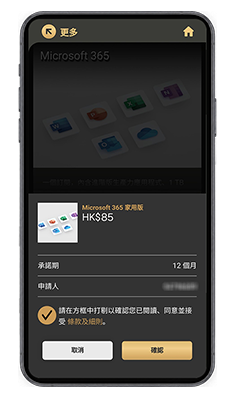
1.於首頁點選「增值服務」
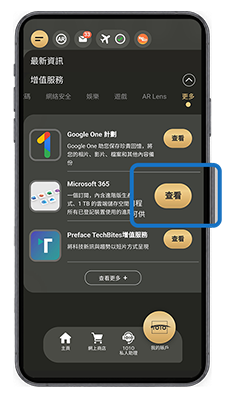
2.於「更多」點選「查看」
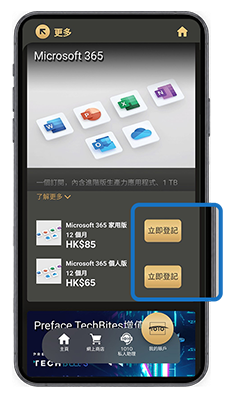
3.點選「立即登記」
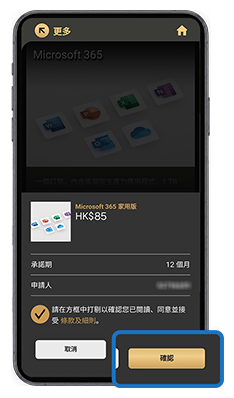
4.點選「確認」,即成功購買,頁面會顯示產品的兌換碼
有關產品的兌換碼,會於計劃生效後透過SMS發送到客戶登記之手提電話。
- 登記一個Microsoft 賬戶。
- 到 https://redeem.microsoft.com/ 輸入有關兌換碼,即可成功兌換。
*兌換碼的有效期為計劃生效日起計6個月。


| Microsoft 365 個人版/家用版組合之條款及細則: | |
|
|
| *AI 功能僅適用於訂閱擁有者,且無法與其他 Microsoft 365 家用版成員共用,並有用量限制。 Microsoft 365 個人版和家用版訂閱者每個月可獲得 60 點 AI 點數,其可用於各種應用程式,包括 Word、Excel、PowerPoint、Outlook、Forms、OneNote、Designer、記事本、相片和小畫家。使用 AI 功能可能有最低年齡限制。詳情參見:https://aka.ms/Copilot-In-M365-FAQ | |
| ^「Microsoft 365 家用版組合」提供最多 2 TB 的雲端儲存空間,可供一至六位用戶共享。 | |
| **Microsoft官網的家用版和個人版月費分別為每月HK$102及HK$78。 | |
| Microsoft 365 推廣之條款及細則: | |
|
|
AI 功能提升生產力*
支持最多 6 人共同訂閱*
包含 Office 應用程式
多達 2TB 共享儲存空間^
Microsoft 365 新增的 Copilot 功能
Copilot in Word
智慧內容生成與視覺化
輸入指令即可自動生成文件標題及詳細內容,還可上傳資料進行摘要、濃縮重點或創作新內容,更可以根據指令改寫內容並進行視覺化,優化設計。
Copilot in Excel
數據分析與視覺化
輸入指令即可智慧摘要數據、分析,並將其視覺化為圖表,無須記住繁瑣公式函數。
Copilot in PowerPoint
PPT 智慧生成與排版
輸入簡報所需的內容、受眾、風格等指令,即可自動生成符合主題的引用文獻及相關圖片,還可優化排版,讓 PPT 製作更加高效。
Copilot in Outlook
郵件生成、改寫與摘要分析
輸入大致思路即可生成郵件全文,提供多個選項選擇,並可調整文章長度和語調,支持多語言撰寫。同時,可透過摘要功能快速擷取郵件核心重點,幫助您迅速了解內容。
妥善保護你的檔案
全面保障您的照片、文件、電子郵件、個人資料和裝置的安全,確保您所珍視的數位資產安然無虞。
| 產品 | Microsoft 365 家用版 | Microsoft 365 個人版 |
|---|---|---|
| 用戶數量 | 最多6個用戶使用 | 1個用戶 |
| 裝置 | 適用於 Windows、macOS、iOS 和Android (iOS 和 Android 需另外安裝軟件) | 適用於 Windows、macOS、iOS 和Android (iOS 和 Android 需另外安裝軟件) |
| OneDrive 雲端儲存 | 2TB | 1TB |
| Word/Excel/ PowerPoint |
✓ | ✓ |
| Outlook | ✓ | ✓ |
| Publisher & Access | ✓ (僅適用於 PC) | ✓ (僅適用於 PC) |
| 技術支援 | ✓ | ✓ |
| 84折**月費 | $85(承諾期後自動取消) | $65(承諾期後自動取消) |
| 承諾期 | 12個月 | 12個月 |
購買流程
1.於首頁點選「增值服務」
2.於「更多」點選「查看」
3.點選「立即登記」
4.點選「確認」,即成功購買,頁面會顯示產品的兌換碼
有關產品的兌換碼,會於計劃生效後透過SMS發送到客戶登記之手提電話。
- 登記一個Microsoft 賬戶。
- 到 https://redeem.microsoft.com/ 輸入有關兌換碼,即可成功兌換。
*兌換碼的有效期為計劃生效日起計6個月。
| Microsoft 365 個人版/家用版組合之條款及細則: | |
|
|
| *AI 功能僅適用於訂閱擁有者,且無法與其他 Microsoft 365 家用版成員共用,並有用量限制。 Microsoft 365 個人版和家用版訂閱者每個月可獲得 60 點 AI 點數,其可用於各種應用程式,包括 Word、Excel、PowerPoint、Outlook、Forms、OneNote、Designer、記事本、相片和小畫家。使用 AI 功能可能有最低年齡限制。詳情參見:https://aka.ms/Copilot-In-M365-FAQ | |
| ^「Microsoft 365 家用版組合」提供最多 2 TB 的雲端儲存空間,可供一至六位用戶共享。 | |
| **Microsoft官網的家用版和個人版月費分別為每月HK$102及HK$78。 | |
| Microsoft 365 推廣之條款及細則: | |
|
|