





在安卓上激活 eSIM
请按照以下简单步骤,使用安卓设备上的二维码来设置并激活您的 eSIM。
eSIM set-up and activation on Android phones using QR code (example: Galaxy Z Flip)

Tap “Settings”
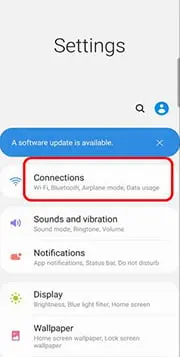
Tap “Connections”
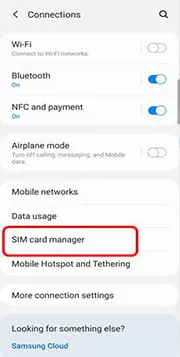
Tap “SIM card manager”

Tap “Add mobile plan”

Tap “Add using QR code” / ”Add using activation code”

Scan the QR code from eSIM Voucher to register
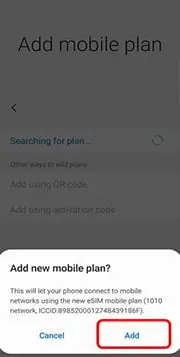
Tap “Add” for new mobile plan
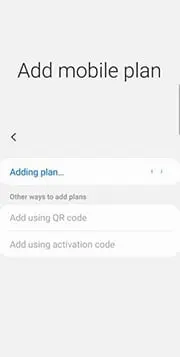
“Adding plan…” is shown
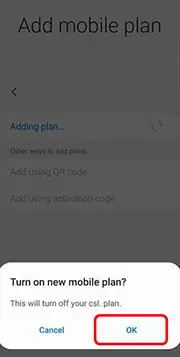
Tap “OK” for activate new mobile plan
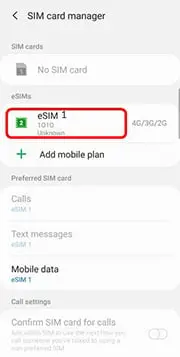
激活完成后, 您会看到新的 eSIM 已加载并正在使用网络
在安卓手机上使用二维码设置和激活 eSIM 的方法

点击 “设置”

点击“连接”
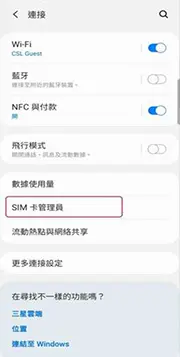
点击 “SIM 卡管理员”
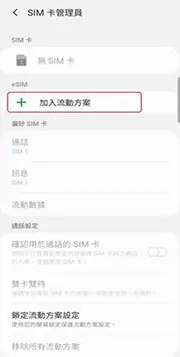
"点击 “添加移动套餐”
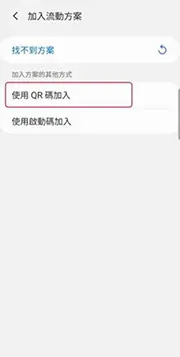
点击 “使用二维码添加” / “使用激活码添加”

使用设备扫描 eSIM 代金券上的 二维码
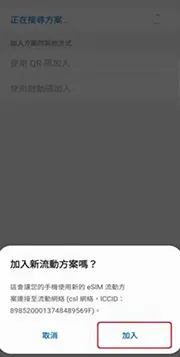
点击 “添加” 以新增移动套餐"

点击 “确定” 以启动新移动套餐

点击 “确定” 以启动新移动套餐
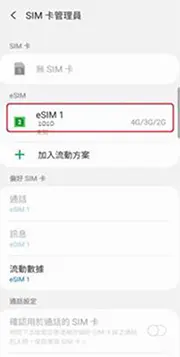
完成启动后, 会看到新 eSIM 载入并使用网络中